

Data annotation is the backbone of AI and machine learning, transforming raw data into structured datasets that power applications like self-driving cars, medical diagnostics, and chatbots. For freelancers, students, and professionals in data annotation, choosing the right tool can make or break your workflow.
In 2025, free annotation tools have become more powerful, offering robust features for text, image, video, and web annotation. This article highlights the top five free annotation tools, detailing their pros, cons, suitability for beginners or pros, and their best use cases, with a focus on customer collaboration.
Whether you’re new to annotation or a seasoned pro, these tools can help you excel without breaking the bank.
Why Free Annotation Tools Matter
Free annotation tools democratize access to AI training, enabling freelancers, small teams, and students to contribute to cutting-edge projects. These tools support diverse tasks—labeling images, tagging text, or annotating videos—while offering collaboration features for seamless teamwork with clients or colleagues.
With AI demand surging (job postings for AI skills grew 3.5x faster than overall jobs in 2024), free tools are a gateway for beginners to build skills and for pros to scale efficiently. Below, we compare five standout free tools in 2025, based on features, usability, and community feedback from sources like Reddit, X, and industry blogs.
Top 5 Free Annotation Tools in 2025
- Label Studio
An open-source, web-based tool for text, image, audio, and video annotation, widely used for machine learning projects.
Pros:
- Supports multiple data types (text, images, videos, audio).
- Customizable workflows for tasks like object detection or sentiment analysis.
- Strong community support with active GitHub contributions.
- Integrates with ML frameworks (e.g., PyTorch, TensorFlow).
Cons:
- Steep learning curve for non-technical users.
- Limited automation in the free version.
- Requires setup on local servers or cloud, which can be complex.
Best For: Pros building custom workflows for complex AI projects.
Why: Label Studio’s flexibility and multi-format support make it ideal for experienced annotators working on diverse datasets (e.g., computer vision, NLP). Its open-source nature allows pros to tailor it to specific needs, but setup complexity can challenge beginners.
Customer Collaboration: Label Studio’s collaboration features allow multiple users to work on projects via shared workspaces. Teams at companies like Intel use it for internal data labeling, with APIs enabling integration into client pipelines for real-time feedback.
- Doccano
An open-source, web-based tool focused on text annotation for NLP tasks like sentiment analysis and named entity recognition.
Pros:
- Beginner-friendly, simple web interface.
- Supports text classification, sequence labeling, and sequence-to-sequence tasks.
- Easy setup via PyPI installation.
- Free with no usage limits.
Cons:
- Limited to text annotation; no image or video support.
- Basic collaboration features; lacks advanced team management.
- No relationship labeling or nested classifications.
Best For: Beginners starting with text-based NLP projects.
Why: Doccano’s intuitive UI and minimal setup make it perfect for newcomers to text annotation. Its simplicity suits small-scale projects, but pros may find it limiting for complex tasks or multi-format datasets.
Customer Collaboration: Doccano supports multi-user projects, allowing teams to annotate concurrently. Small startups use it for quick dataset creation, sharing annotation guidelines directly in the app for client alignment.
- CVAT (Computer Vision Annotation Tool)
An open-source tool by Intel, designed for image and video annotation, supporting tasks like object detection and segmentation.
Pros:
- Robust for computer vision (bounding boxes, polygons, semantic segmentation).
- Semi-automatic annotation speeds up labeling.
- Free and deployable via Docker.
- Strong community support.
Cons:
- Complex local setup requires technical expertise.
- Limited to image and video; no text or audio support.
- Scalability issues for large datasets without paid cloud options.
Best For: Pros in computer vision projects.
Why: CVAT’s advanced annotation types and semi-automatic tools are tailored for experienced annotators working on image or video datasets. Beginners may struggle with its technical setup and lack of broader data support.
Customer Collaboration: CVAT’s collaborative features allow teams to assign tasks and review annotations. Companies like Intel leverage CVAT for internal vision projects, with clients providing feedback via shared dashboards.
- LabelMe
An open-source tool by MIT CSAIL for image annotation, offering a dataset of annotated images for computer vision tasks.
Pros:
- Free and open to external contributions.
- Supports multiple annotation types (polygons, rectangles, circles, lines).
- Simple web-based interface.
- Community-driven dataset sharing.
Cons:
- Exports only in JSON format, limiting compatibility.
- No built-in collaboration features.
- Outdated UI compared to modern tools.
Best For: Beginners in image annotation.
Why: LabelMe’s simplicity and free dataset access make it ideal for newcomers learning image annotation. Pros may find its lack of collaboration and limited export options restrictive for large-scale projects.
Customer Collaboration: Limited collaboration features mean LabelMe is better for solo work. Small research teams use it for academic projects, sharing annotated datasets via external platforms like Google Drive.
- Markup Hero
A Chrome extension for annotating websites, PDFs, and images, focusing on visual feedback and collaboration.
Pros:
- Free plan with basic annotation features (arrows, text, highlights).
- No installation required for websites; uses browser extension.
- Shareable links for easy collaboration.
- Intuitive for non-technical users.
Cons:
- Limited to basic annotations; no advanced ML features.
- Free plan caps storage and features.
- Extension-based, so no mobile support.
Best For: Beginners needing web or PDF annotation for client feedback.
Why: Markup Hero’s ease of use and shareable links make it perfect for beginners collaborating on web projects or PDFs. Pros may need more robust tools for ML-specific tasks.
Customer Collaboration: Markup Hero excels in client feedback, allowing users to share annotated screenshots via links without requiring client sign-ups. Agencies like Prontto use it for quick client reviews, streamlining web design feedback.
Which Tool Is Best for What and Why?
Best for Beginners (Text Annotation): Doccano
Why: Its simple web interface and easy setup (via PyPI) make it accessible for newcomers to NLP tasks like sentiment analysis. The lack of complex features ensures quick onboarding, though it’s limited to text.
Best for Beginners (Image/Web Annotation): Markup Hero
Why: Its Chrome extension and shareable links simplify web and PDF annotation for non-technical users. Ideal for freelancers collaborating with clients on web design or content review, but not suited for ML datasets.
Best for Pros (Computer Vision): CVAT
Why: Advanced annotation types (e.g., semantic segmentation) and semi-automatic tools cater to experienced annotators in computer vision. Its technical setup is a hurdle, but pros benefit from its precision and community support.
Best for Pros (Multi-Format ML Projects): Label Studio
Why: Its versatility across text, image, video, and audio, plus ML framework integrations, make it a go-to for pros handling complex AI projects. Customizable workflows suit large-scale, client-driven tasks.
Best for Academic Image Annotation: LabelMe
Why: Its free dataset access and simple interface are great for students or researchers starting image annotation. Limited collaboration makes it less ideal for team projects.
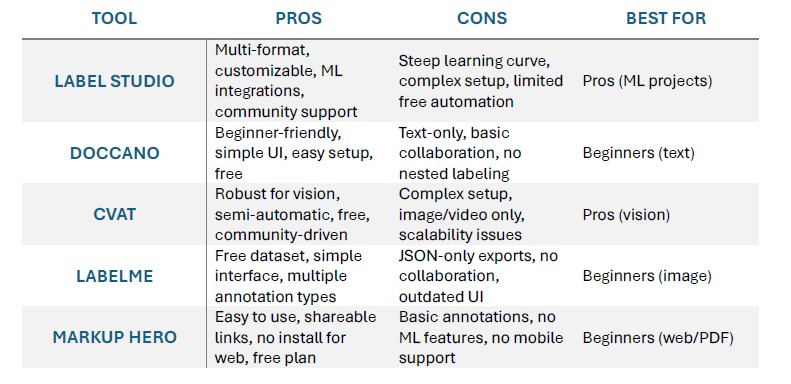
Tips for Freelancers – Maximizing Earnings with Free Tools
By strategically leveraging the power of free and open-source data annotation tools, freelancers can significantly maximize their earnings. Here are some tips.
Master Your Tools, Specialize Your Niche
While general annotation skills are valuable, specialization is key to higher earnings. Each free tool excels in different areas.
- For Computer Vision (Images/Video): Dive deep into CVAT, Label Studio. Master bounding boxes, polygons, semantic segmentation, and keypoint annotation. Consider specializing in niche areas like:
- Autonomous Vehicles: Object detection (cars, pedestrians, traffic signs) in complex environments.
- Medical Imaging: Annotating X-rays, MRIs, or CT scans for disease detection (requires domain knowledge, which commands higher rates).
- E-commerce: Product categorization and attribute labeling.
- For Natural Language Processing (Text): Become an expert in Doccano. Focus on:
- Sentiment Analysis: Identifying emotions in text.
- Named Entity Recognition (NER): Extracting specific entities like names, locations, or organizations.
- Text Classification: Categorizing articles, reviews, or emails.
- For Audio Data: While less represented in purely free tools, some platforms like Label Studio can handle audio. Develop skills in:
- Transcription and Segmentation: Converting speech to text and marking speaker turns or significant events.
- Sound Event Detection: Identifying specific sounds in an audio clip.
By mastering a few tools and focusing on specific, high-demand annotation types, you become a go-to expert, justifying higher rates.
Build an Impressive Portfolio
Your portfolio is your resume. Since you’re using free tools, you have the advantage of creating numerous high-quality samples.
- Showcase Diversity: Include projects using different tools and covering various annotation types (e.g., an image dataset annotated with bounding boxes in CVAT, a text dataset with NER in Doccano).
- Highlight Accuracy and Speed: For each project, briefly explain the task, the tools used, and emphasize your accuracy and efficiency. If possible, quantify your output (e.g., “Annotated X images with Y% accuracy in Z hours”).
- Create Your Own Datasets: Download public datasets (e.g., from Kaggle or Hugging Face) and annotate them using your chosen free tools. This demonstrates initiative and skill without relying solely on client projects.
- Professional Presentation: Use a simple website, a dedicated Google Drive folder, or a GitHub repository to present your work neatly.
Leverage Freelancing Platforms Strategically
Many freelancing platforms (Upwork, Fiverr, PeoplePerHour) and specialized data annotation platforms (Appen, Telus Digital, Clickworker, Remotasks, Data Annotation Tech, Toloka AI, OpenTrain AI) have a high demand for data annotators.
- Optimize Your Profile: Clearly state your expertise, the tools you’re proficient in, and your specialized niches.
- Competitive Bidding (Initially): When starting, you might need to bid slightly lower to gain initial clients and positive reviews. Once you have a track record, increase your rates.
- Focus on Quality: Platforms often monitor quality. Delivering highly accurate work consistently will lead to more invitations for projects and better-paying opportunities.
- Seek Direct Clients: As you build your reputation, actively seek direct clients. This bypasses platform fees, allowing you to keep a larger share of your earnings. LinkedIn, industry forums, and AI/ML communities are great places to network.
Embrace Continuous Learning
The AI landscape is constantly evolving, and so are annotation techniques.
- Stay Updated: Follow AI and ML news, blogs, and research. New data types and annotation challenges will emerge.
- Explore Advanced Features: Even free tools often have hidden depths. Explore all features and shortcuts to boost your efficiency.
- Learn Basic AI Concepts: A fundamental understanding of machine learning concepts (e.g., supervised learning, model bias) can help you understand why you’re annotating data in a certain way, leading to more intelligent and accurate work.
- Consider Coding (Optional, but Beneficial): While not strictly necessary for most annotation roles, learning basic Python or scripting can unlock higher-paying projects, especially those involving automation or custom tool development.
Conclusion
The best free annotation tools in 2025—Label Studio, Doccano, CVAT, LabelMe, and Markup Hero—cater to diverse needs, from text to computer vision. Beginners should start with Doccano for text or Markup Hero for web/PDF tasks due to their simplicity and collaboration features. Pros should opt for Label Studio or CVAT for their flexibility and ML integrations, ideal for complex AI projects. By leveraging these tools, upskilling in Python or domain expertise, and engaging with communities on X or Reddit, freelancers can maximize earnings and deliver high-quality datasets.
Start exploring these tools today, and share your experiences below!


Share your experience and your comments