
Category: Career & Community

  • The Linguistic Catalyst: How Data Annotation Powers the NLP Revolution

    The Linguistic Catalyst: How Data Annotation Powers the NLP Revolution

    Subscribe to continue reading

    Subscribe to get access to the rest of this post and other subscriber-only content.

  • The Annotator’s Compass: Mastering Rubrics for High-Quality ML Data

    The Annotator’s Compass: Mastering Rubrics for High-Quality ML Data

    9–14 minutes

    In the world of Machine Learning (ML) and Artificial Intelligence (AI), the quality of the final model is a direct reflection of the quality of its training data. And at the heart of quality data lies data annotation. If data annotation is the process of labeling raw data to give AI a sense of “sight” or “understanding,” then the Data Annotation Rubric is the non-negotiable set of rules that governs that process. It is the single most critical document that ensures consistency, accuracy, and fidelity across millions of data points, bridging the gap between human understanding and machine logic.
    More than ever, annotators are required to master rubrics, and many annotation platforms ask freelancers to learn and apply the rules very quickly and precisely. This article will tackle this important topic by explaining what rubrics are and why they matter and, as usual, proposing some tips and recommendations.
    Whether you’re a beginner just starting your journey as a freelance annotator or a seasoned data scientist struggling to scale your quality assurance (QA) process, mastering the rubric is the key to unlocking better models and better career opportunities.

    Basic Concepts: What is a Data Annotation Rubric?

    A data annotation rubric is a structured scoring system or checklist used to assess the quality of labels applied to data based on predefined, objective criteria. Think of it as the ultimate source of truth, moving beyond general project guidelines to provide granular, measurable standards for what constitutes a “correct” or “high-quality” annotation.
    While Annotation Guidelines tell you how to annotate (e.g., “Use a bounding box for cars”), the Rubric tells you how well the annotation meets the project’s quality bar (e.g., “A bounding box must be snug to the object with a maximum of 3 pixels of padding”).

    The Core Components of a Rubric

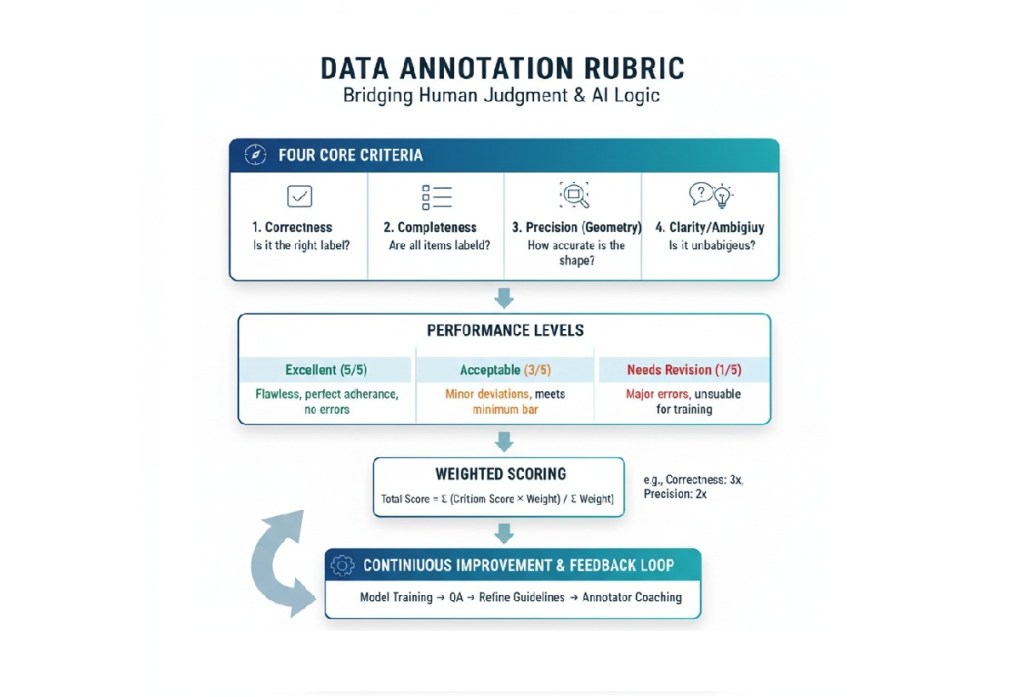
    Rubrics break down the abstract concept of “quality” into quantifiable dimensions. While every project is unique, a solid rubric typically evaluates these four core criteria:

    Rubric CriterionQuestion it AnswersExample for an Image Bounding Box Task
    CorrectnessDoes the label/class match the object in the data?Is the object labeled ‘Truck’ actually a truck, or is it a bus?
    CompletenessAre all required features or entities labeled?Are all pedestrians in the frame labeled, or was one missed?
    Precision (Geometry)Is the shape/location of the annotation accurate?Is the bounding box tight around the object, or does it include too much background space?
    Clarity/AmbiguityIs the annotation clear and unambiguous for downstream use?Does the annotator use the ‘Unsure’ tag correctly for blurry images, or is a clear object incorrectly flagged as ‘Unsure’?

    A good rubric will not only define these criteria but will also include performance levels (e.g., Excellent, Acceptable, Needs Revision) with detailed, descriptive text for each level, making quality assessment objective rather than subjective.

    Why Rubrics are Non-Negotiable in ML/AI

    In the high-stakes environment of AI development—where data errors can lead to everything from frustrating user experiences to dangerous outcomes in self-driving cars or medical diagnostics—rubrics are essential for both people and models. Here are three key points to consider.

    The Bedrock of Model Accuracy
    Garbage In, Garbage Out (GIGO). Your machine learning model is only as smart as the data you feed it. Data errors can reduce AI performance by up to 30%. A robust rubric ensures the data used for training is high-fidelity Ground Truth.

    • Establishing Ground Truth: The rubric defines the “correct answer” the model learns from. Without a uniform definition of “correct,” the model trains on noisy, inconsistent data, leading to poor generalization.
    • Reducing Bias: A detailed rubric helps spot and mitigate subtle human biases or subjective interpretations by forcing annotators to adhere to objective, measurable standards. For instance, in sentiment analysis, a rubric clarifies the line between ‘Neutral’ and ‘Slightly Positive’ with explicit examples.

    Consistency Across the Workforce
    Data annotation projects often involve large teams, sometimes hundreds or thousands of annotators and Quality Assurance (QA) specialists. Different people have different interpretations.

    • Standardized Training: For beginners, the rubric is the primary training document. It provides a clear, single source of truth for learning the task, dramatically shortening the ramp-up time and ensuring everyone starts with the same quality standard.
    • Inter-Annotator Agreement (IAA): Rubrics are the tool QA teams use to measure IAA. If two annotators label the same data point, their scores on the rubric should be close. Wide deviations signal an issue with the annotator’s understanding or, more critically, an ambiguity in the guideline itself.

    Efficiency in the Human-in-the-Loop Workflow
    For project managers and data scientists, the rubric is a powerful QA tool that goes beyond simple statistical metrics (like overall accuracy).

    • Qualitative Feedback Loop: While a statistical score might say “80% accuracy,” the rubric explains why the remaining 20% failed (e.g., “Precision error on polygon corners” or “Missing attribute for occlusion”). This qualitative feedback is vital for the iterative refinement of both the annotation process and the model’s performance.
    • Targeted Improvement: By quantifying error types, rubrics help direct re-training efforts for annotators and highlight edge cases that need to be explicitly added to the main guidelines.

    Getting Started: The Beginner’s Guide to Rubrics

    If you’re a new data annotator, the rubric can seem intimidating, but mastering it is the most direct path to becoming a high-performing, high-value asset.

    Treat the Rubric as Your Bible
    Never, ever start annotating a task without thoroughly reading the entire rubric and its accompanying guidelines.

    • The Annotation Guidelines detail the what (the classes, the tools, the process).
    • The Rubric details the how well (the definition of quality and what mistakes look like).

    For example, a guideline might say “label all cars.” The rubric will clarify:

    Criterion: Precision. Acceptable: Bounding box must be within 5 pixels of the object outline. Unacceptable: Box cuts into the object or extends more than 10 pixels outside.

    Focus on the Descriptors
    A rubric is a grid. Pay the most attention to the Performance Descriptors—the text blocks that describe each score level (e.g., “Excellent,” “Good,” “Poor”).

    • Study the “Excellent” Column: This is the project’s goal. Memorize what perfect looks like for each criterion.
    • Study the “Unacceptable” Column: These are the common pitfalls and errors. Train yourself to spot these in your own work before submission.

    Annotate a Small Sample and Self-Score
    Before tackling large batches, take 10-20 examples. Apply your labels, and then critique your own work using the rubric as if you were the QA lead.

    Your AnnotationRubric CriterionYour Self-ScoreKey Takeaway
    Car Bounding BoxPrecisionAcceptable (3/5)Need to be tighter; box is 7 pixels out.
    Text SentimentCorrectnessExcellent (5/5)The phrase ‘not too bad’ is correctly classified as ‘Neutral.’
    Missing ObjectCompletenessNeeds Revision (1/5)Forgot to label a partially occluded bike. Must re-read occlusion rules.

    This self-assessment builds the critical judgment that separates a fast annotator from a high-quality annotator.

    Advanced Mastery: Becoming a Rubric Expert

    For experienced professionals—freelancers seeking higher-paying, more complex projects or data scientists designing the QA workflow—mastering the rubric shifts from following rules to creating and refining them.

    From Follower to Creator: Designing Analytic Rubrics

    The most effective rubrics are typically analytic rubrics, which break quality down by multiple criteria, rather than holistic rubrics (which provide a single score). Creating one involves several key steps:

    A. Align Criteria to Model Requirements

    The rubric criteria must directly support what the downstream ML model needs to learn.

    • Object Detection (Vision): Prioritize Precision (tight bounding boxes, accurate polygon edges) and Completeness (no missed objects).
    • Named Entity Recognition (NLP): Prioritize Correctness (accurate entity classification) and Clarity (correct boundary span—not including trailing punctuation, for instance).
    • Medical or Legal Data: High emphasis on Correctness and Consistency, often requiring subject matter expert (SME) validation.

    B. Define the Levels of Performance

    Use clear, measurable, and actionable language for the performance levels. Avoid vague terms.

    Performance LevelExample Descriptor (for Polygon Precision)
    Gold Standard (5)The polygon follows the visible object perimeter with zero pixel deviation except where occlusion occurs.
    Acceptable (3)The polygon follows the perimeter but has a maximum of 2-pixel deviation or minor corner rounding.
    Needs Re-Annotation (1)The polygon cuts into the object or extends more than 3 pixels past the perimeter.

    C. Implement Adjudication and Weighting

    In large-scale projects, not all errors are equal. The rubric must reflect this via a weighted scoring system.

    • Critical Errors: Errors that could lead to model failure (e.g., Correctness errors, such as mislabeling a pedestrian as a traffic light) should carry a higher weight (e.g., $3 \times$ multiplier).
    • Minor Errors: Errors that are less likely to impact model performance (e.g., slight aesthetic imperfections in a bounding box) should carry a lower weight.

    The rubric should also include an Adjudication Strategy to resolve conflicts when multiple annotators disagree on a label. This might involve a consensus vote or sending the data point to a designated Domain Expert for final “Gold Label” creation.

    Using Rubrics to Elevate Freelancer Proficiency

    For a freelance data annotator, moving beyond simple task completion to true proficiency means higher pay, more complex work, and greater job security. The rubric is your secret weapon.

    Skill Development AreaHow the Rubric Guides Improvement
    Attention to DetailInternalize the Precision Criteria. Instead of simply labeling, you are now performing a quality check on your own work against the high standard set in the rubric. This shift from labeler to QA specialist is invaluable.
    Time ManagementIdentify Your Bottlenecks. When you self-score, note which criteria you struggle with and how much time you spend on them. If precision takes too long, practice geometry tools. If completeness is an issue, develop a systematic scanning pattern.
    Critical ThinkingMaster the Edge Cases. High-value tasks often revolve around ambiguity (e.g., is a partially obscured item visible enough to label?). The rubric forces you to think critically, applying specific rules to unique, complex scenarios. You move from what is it? to how does the rule apply here?
    CommunicationClarity in Queries. When you encounter a truly ambiguous data point, your communication with the project manager should reference the rubric. Instead of “I’m confused,” you say: “On item #123, the object meets the visibility threshold for ‘Occluded,’ but the geometry violates the ‘Minimum Pixels’ rule. Should I prioritize the bounding box rules or the visibility rules?” This level of specificity marks you as a true professional.

    Advanced Rubric-Related Techniques for Pros

    1. “Gold Task” Creation: Professional QA annotators are often tasked with creating a set of Gold Standard tasks—data points that are perfectly labeled according to the rubric. These are later used to test and score other annotators. Mastering this means you fully understand the ultimate standard of quality.
    2. Error Analysis & Feedback: Beyond simply annotating, offer to perform error analysis on a team’s completed work. Use the rubric to categorize and quantify the frequency of errors. This service is a high-value skill that elevates you from an annotator to a Data Quality Analyst.
    3. Tool Mastery: Proficiency isn’t just knowing the rules; it’s using the annotation tool flawlessly to meet the geometric standards of the rubric. Can you snap a bounding box to a polygon, or use automated tracking while maintaining the required pixel precision?

    The Rubric as a Quality Assurance Tool

    For project leads and data scientists, the rubric is the framework for a robust QA process. Its implementation is what protects the integrity of the training data.

    Inter-Annotator Agreement (IAA) Scoring

    IAA is the statistical measure of how often different annotators agree on the label for the same piece of data.

    • Using the Rubric: When two annotators score the same data point, a discrepancy in their rubric scores immediately flags the item for review. A high IAA score across all criteria means the rubric (and guidelines) are clear and the annotators are well-trained. A low score indicates a flaw in the project design.
    • Kappa Score: For classification tasks, the Cohen’s Kappa or Fleiss’ Kappa score is often used. The rubric serves as the qualitative guide to interpret why the Kappa score is low—is it a problem with Correctness or Completeness?

    The Active Learning Feedback Loop

    In modern AI workflows, annotation is not a one-time step but a continuous loop.

    1. Annotate: A batch of data is labeled.
    2. QA with Rubric: The rubric scores are used to identify high-error data points (failures in Correctness, Precision, etc.).
    3. Refine Guidelines: The frequent errors identified by the rubric are used to clarify ambiguous rules in the original guidelines.
    4. Model Training: Only the high-quality, rubric-validated data is used to train the model.
    5. Active Learning: The model is deployed to pre-label new data. The rubric is then used to QA the model’s automated annotations, ensuring the automated work meets the human-defined quality standard.

    Final Thoughts

    As AI models become more complex (e.g., multimodal, generative AI), the annotation tasks become increasingly subjective (e.g., ranking conversational quality, assessing ethical alignment). This shift makes the qualitative judgment enabled by a strong rubric more crucial than ever before.
    The most successful data annotators and data teams will be those who view the rubric not as a punitive checklist, but as the scientific definition of data quality. Mastering its criteria, applying them consistently, and even participating in their creation is how you ensure that your contribution to the ML pipeline is foundational, reliable, and high-value.

    What about your experience with rubrics? Comment and share your thoughts below!


    Go back

    Your message has been sent

  • Mastering Prompt Engineering: The Gateway to High-Paying AI Careers in 2025

    Mastering Prompt Engineering: The Gateway to High-Paying AI Careers in 2025

    7–11 minutes

    In the rapidly evolving world of artificial intelligence (AI) and machine learning (ML), prompt engineering has emerged as a critical skill that bridges human intent with machine intelligence. For those looking to break into or advance in the field of data annotation for AI and ML, understanding prompt engineering is not just an asset—it’s a game-changer.
    Data annotation has always been about creating training datasets that help AI systems understand and interpret information correctly. Prompt engineering extends this concept into the realm of generative AI, where instead of labeling data for future training, we’re crafting instructions that guide AI models to produce desired outputs in real-time.
    The synergy between these fields is profound. Traditional data annotation taught us to think systematically about how machines interpret information—understanding edge cases, maintaining consistency, and ensuring quality at scale. These same principles form the foundation of effective prompt engineering, making data annotators naturally positioned to excel in this emerging field.
    This article explores the relevance of prompt engineering in data annotation, offers practical tips to get proficient, and provides a clear learning path to help both newcomers and seasoned professionals thrive.

    What is Prompt Engineering and Why Does It Matter in Data Annotation?

    Prompt engineering is the art and science of crafting precise inputs (prompts) to guide large language models (LLMs) and other AI systems to produce accurate, relevant, and contextually appropriate outputs. Think of it as designing the perfect question or instruction to get the most useful response from an AI model. This skill is pivotal in applications ranging from content generation to complex problem-solving, and it’s increasingly integral to data annotation workflows. In data annotation, prompt engineering enhances the efficiency and quality of labeled datasets, which are the backbone of AI and ML models. For example, annotators might use well-crafted prompts to guide AI tools in generating initial labels for text, images, or videos, which humans then refine. This hybrid approach—combining AI-assisted annotation with human oversight—reduces manual effort, speeds up workflows, and improves accuracy. In industries like healthcare, where annotators label medical records or images for diagnostics, or in retail, where sentiment analysis drives customer insights, prompt engineering ensures AI tools produce high-quality, context-specific annotations. The synergy between prompt engineering and data annotation lies in their shared goal: creating high-quality, structured data to train AI models. As businesses generate massive volumes of unstructured data—over 3 quintillion bytes daily—prompt engineering helps annotators preprocess and label this data efficiently, enabling AI systems to deliver actionable insights.

    Essential Skills and Proficiency Development

    Becoming proficient in prompt engineering requires a structured approach to skill development. The most successful practitioners combine technical understanding with creative problem-solving abilities.

    Foundation Skills

    Start with understanding how large language models work conceptually. You don’t need to dive deep into transformer architectures, but grasping concepts like context windows, token limitations, and attention mechanisms will inform better prompt design decisions. Familiarize yourself with different AI model types—from GPT variants to specialized models for code generation, image creation, and domain-specific applications.

    Core Prompt Engineering Techniques

    Master the fundamental prompt patterns that form the backbone of effective AI communication. Zero-shot prompting involves giving the AI a task without examples, relying on clear instructions and context. Few-shot prompting provides examples within the prompt to guide the model’s understanding of desired output format and style. Chain-of-thought prompting encourages the AI to show its reasoning process, particularly valuable for complex analytical tasks.
    Learn to structure prompts with clear roles, context, and constraints. A well-structured prompt typically includes the role you want the AI to assume, relevant background information, the specific task or question, and any constraints or formatting requirements for the output.

    Advanced Techniques

    Develop expertise in prompt chaining, where complex tasks are broken down into sequential prompts that build upon each other. Master the art of prompt optimization through systematic testing and iteration. Learn to identify and mitigate common pitfalls like hallucination, bias amplification, and context drift.

    Industry-Specific Applications

    Focus on developing expertise in specific domains where your data annotation background provides an advantage. Healthcare, legal, financial services, and technical documentation all have unique requirements and compliance considerations that reward specialized knowledge.

    Quality Assurance and Testing

    Apply your data annotation quality mindset to prompt engineering. Develop systematic approaches to testing prompts across different scenarios, edge cases, and model versions. Learn to create evaluation frameworks that measure prompt effectiveness objectively.

    Strategic Learning Path for Career Transition

    The path from data annotation to prompt engineering expertise can be navigated strategically with the right approach and timeline.

    Phase 1: Foundation Building

    Begin with understanding the landscape of generative AI and its applications. Take introductory courses on large language models and their capabilities. Practice basic prompt engineering with freely available tools like ChatGPT, Claude, or Gemini. Start a prompt engineering journal documenting your experiments, what works, and what doesn’t.
    Focus on translating your data annotation experience into prompt engineering concepts. If you’ve worked on image annotation, explore how to prompt image generation models. If you’ve done text classification, practice prompts that require similar categorization and analysis tasks.

    Phase 2: Skill Development

    Deepen your technical understanding through structured learning. You can enroll in comprehensive prompt engineering courses that cover advanced techniques and real-world applications. Practice with different model types and APIs to understand their unique characteristics and optimal prompting strategies.
    Start building a portfolio of prompt engineering projects that demonstrate your capabilities. Create prompts for tasks similar to your data annotation work, showing how you can guide AI to perform quality analysis, content categorization, or data extraction tasks.

    Phase 3: Specialization and Portfolio Building

    Choose a specialization area that aligns with your existing domain knowledge from data annotation work. Develop deep expertise in prompt engineering for that specific field, and create comprehensive case studies showing before-and-after results of your prompt optimization work.
    Begin contributing to the prompt engineering community through blog posts, open-source projects, or community forums. This visibility helps establish your expertise and can lead to networking opportunities.

    Phase 4: Professional Transition

    Start applying for prompt engineering roles, emphasizing your unique background in data quality and AI training data preparation. Consider hybrid roles that combine data annotation oversight with prompt engineering responsibilities (many companies need professionals who can bridge traditional ML training pipelines with new generative AI applications). Network with professionals who have made similar transitions. Join prompt engineering communities, attend AI conferences, and participate in hackathons or competitions that showcase prompt engineering skills.

    Emerging Trends Shaping the Field

    The prompt engineering landscape is rapidly evolving, with several key trends defining its future direction. One of the most significant trends in prompt engineering is the use of mega-prompts. Unlike traditional short prompts, mega-prompts are longer and provide more context, which can lead to more nuanced and detailed AI responses.

    Automated Prompt Generation

    Generative AI prompt creation is a new trend in prompt engineering, where AI systems help create and optimize prompts for specific use cases. This meta-application of AI creates opportunities for prompt engineers to focus on higher-level strategy and quality assurance rather than manual prompt crafting.

    Integration with Traditional ML Pipelines

    In 2025, generative models are increasingly being used to pre-label data, which human annotators can then refine, significantly reducing the time and effort required for large-scale projects. This trend directly impacts data annotation professionals, creating hybrid roles that combine traditional annotation oversight with prompt engineering for automated labeling systems.

    Product-Focused Prompt Engineering

    The field is maturing beyond conversational AI into systematic product integration. Companies need prompt engineers who can design prompts that work reliably at scale, integrate with existing software systems, and maintain consistent performance across different use cases and user scenarios.

    Multimodal Prompt Engineering

    As AI models become capable of processing multiple input types simultaneously—text, images, audio, and code—prompt engineers must develop skills in crafting prompts that effectively utilize these multimodal capabilities.

    Recommendations for Professional Success

    Success in prompt engineering requires a combination of technical skills, creative thinking, and strategic career positioning. Leverage your data annotation background as a unique differentiator in the market. Your experience with quality control, edge case identification, and systematic testing translates directly to prompt engineering excellence.
    Develop a systematic approach to prompt iteration and optimization. Document your methods, measure results quantitatively, and build repeatable processes that can scale across different projects and clients. This operational mindset, familiar from data annotation work, sets professional prompt engineers apart from casual practitioners.
    Stay current with the rapidly evolving AI landscape. Follow key researchers, join professional communities, and experiment with new models and techniques as they become available. The field changes quickly, and continuous learning is essential for long-term success.
    Build cross-functional skills that complement your prompt engineering expertise. Understanding of APIs, basic programming concepts, data analysis, and project management will make you more valuable to employers and clients.
    Consider the broader implications of AI systems in your prompt engineering work. Understanding ethical AI principles, bias mitigation, and responsible AI deployment will become increasingly important as these systems are integrated into critical business processes.

    Final Thoughts

    Prompt engineering is more than a buzzword—it’s a transformative skill that empowers data annotators to unlock the full potential of AI and ML. By mastering prompt design, you can streamline annotation workflows, improve model performance, and position yourself as a valuable asset in a rapidly growing job market. With the prompt engineering market projected to soar to USD 2.06 billion by 2030 and the data annotation market expected to reach USD 8.22 billion by 2028, now is the time to invest in this skill.
    Start with foundational AI knowledge, practice crafting effective prompts, and pursue continuous learning through courses and hands-on projects. Whether you’re annotating datasets for autonomous vehicles or optimizing customer insights in retail, prompt engineering will set you apart in the AI revolution. Take the first step today—your career in data annotation and AI awaits!

    Ready to dive into prompt engineering? Share your favorite prompt design tips or job market insights in the comments below.
    For more resources, check out our blog’s guides on data annotation and AI career paths!


    Go back

    Your message has been sent

  • Leveraging Project Management Expertise for Data Annotation and AI Training Success in 2025

    Leveraging Project Management Expertise for Data Annotation and AI Training Success in 2025

    8–12 minutes

    Data annotation and AI training are critical to developing robust AI models, powering applications from autonomous vehicles to medical diagnostics. As the AI industry surges—projected to reach a $1.8 trillion market by 2030—effective project management is essential to streamline complex workflows, ensure high-quality datasets, and meet tight deadlines.
    The precision of AI models hinges on the quality of their training data. And ensuring that data is meticulously prepared, labeled, and refined at scale falls squarely on the shoulders of skilled project managers. Far from a purely technical role, project management in data annotation and AI training is a dynamic blend of logistical prowess, team leadership, and a keen understanding of AI’s ethical implications.
    If you’re an experienced annotator looking to climb the career ladder, or a project management professional eager to dive into the cutting-edge of AI, this field offers immense opportunity. Let’s explore what it takes to excel, navigate ethical challenges, and capitalize on the evolving landscape.

    Data annotation projects involve diverse stakeholders—clients, annotators, data scientists, and quality assurance teams—working across tasks like labeling images, tagging text, or evaluating AI outputs. These projects require meticulous planning, resource allocation, and quality control to deliver datasets that meet AI model requirements.

    At its core, managing data annotation and AI training projects is about orchestrating a complex process to deliver high-quality, relevant data to AI models. This involves:

    • Defining Scope & Guidelines: Collaborating with AI engineers and data scientists to translate AI model requirements into clear, unambiguous annotation guidelines. This is the blueprint for all annotation work.
    • Resource Allocation: Managing annotator teams (in-house or outsourced), ensuring they have the right skills, tools, and bandwidth for the project.
    • Workflow Optimization: Designing efficient annotation pipelines, leveraging appropriate tools, and implementing strategies to maximize productivity without sacrificing quality.
    • Quality Assurance & Control (QA/QC): Establishing rigorous QA processes, including inter-annotator agreement (IAA) metrics, spot checks, and feedback loops, to ensure consistent and accurate labeling.
    • Timeline & Budget Management: Keeping projects on schedule and within budget, adapting to unforeseen challenges, and communicating progress to stakeholders.
    • Troubleshooting & Problem Solving: Addressing annotation ambiguities, tool issues, and performance discrepancies as they arise.
    • Feedback Integration: Facilitating the crucial feedback loop between annotators and AI developers, ensuring that annotation strategies are refined based on model performance.

    Project management expertise ensures efficient workflows, mitigates risks, and aligns deliverables with client goals. With AI-related job postings growing 3.5x faster than overall jobs and offering 5–25% wage premiums, skilled project managers can command high earnings ($50–$150/hour) while driving impactful AI outcomes.

    Effective project management in data annotation requires a blend of traditional skills and AI-specific expertise. Below are the most critical skills and their applications:

    Planning and Scheduling

     Why Needed: Annotation projects involve tight timelines and large datasets (e.g., millions of images for computer vision). Planning ensures tasks are allocated efficiently across freelancers or teams.

    How Applied: Use tools like Asana or Jira to create timelines, assign tasks (e.g., image labeling, text tagging), and track progress. Break projects into phases (e.g., data collection, annotation, quality assurance).

    Example: A project manager schedules 100 annotators to label 10,000 images in two weeks, using milestones to monitor daily progress.

    Resource Management

    Why Needed: Balancing human resources (e.g., freelancers on platforms like Outlier AI) and tools (e.g., Label Studio) optimizes costs and efficiency.

    How Applied: Assign skilled annotators (e.g., coders for Python tasks) to high-priority projects and leverage free tools like CVAT for cost savings.

    Example: A manager allocates medical annotators to TELUS International’s healthcare projects, ensuring expertise matches task complexity.

    Stakeholder Communication

    Why Needed: Clear communication aligns clients, annotators, and data scientists on project goals, guidelines, and feedback.

    How Applied: Use Slack or Zoom for regular check-ins, share guidelines via shared docs, and provide clients with progress dashboards.

    Example: A manager hosts weekly QA sessions to clarify annotation guidelines for Mindrift’s AI tutoring tasks.

    Risk Management

    Why Needed: Risks like inconsistent annotations or missed deadlines can derail AI training. Proactive mitigation ensures quality and timeliness.

    How Applied: Identify risks (e.g., annotator turnover) and create contingency plans, such as cross-training or backup freelancers.

    Example: A manager anticipates task shortages on DataAnnotation.Tech and diversifies across Appen to maintain workflow.

    Quality Assurance (QA)

    Why Needed: High-quality datasets are critical for AI model accuracy. QA ensures annotations meet standards (e.g., 95% accuracy for medical imaging).

    How Applied: Implement overlap checks (e.g., multiple annotators label the same data) and use tools like Label Studio’s review features.

    Example: A manager uses CVAT’s review tools to verify bounding boxes in autonomous vehicle datasets.

    Technical Proficiency (AI and Data Knowledge)

    Why Needed: Understanding AI concepts (e.g., NLP, computer vision) and annotation tools enhances project oversight and client trust.

    How Applied: Learn basics of Python, ML frameworks, or annotation platforms (e.g., Doccano) to guide technical workflows and troubleshoot issues.

    Example: A manager uses Python scripts to automate data preprocessing for Alignerr, speeding up delivery.

    Ethical Decision-Making

    Why Needed: AI projects raise ethical concerns, such as bias in datasets or worker exploitation. Ethical management builds trust and compliance.

    How Applied: Ensure fair annotator pay, transparent guidelines, and bias-free datasets (e.g., diverse representation in facial recognition data).

    Example: A manager reviews datasets for gender or racial bias, consulting clients to align with ethical standards.

    For Newcomers to Project Management

    • Master the Fundamentals of Annotation: Before you can manage annotators, you need to understand their work. Spend time performing various annotation tasks (image, text, audio, video) and become proficient with popular tools (e.g., CVAT, Label Studio, custom platforms).
    • Gain Practical Project Experience: Start with smaller annotation projects. Offer to lead initiatives within your current annotation team or seek out entry-level project coordination roles.
    • Formal Project Management Training: Obtain certifications like the Certified Associate in Project Management (CAPM) or even the Project Management Professional (PMP) from the Project Management Institute (PMI). These provide a structured understanding of project methodologies.
    • Develop Strong Communication & Leadership Skills: Practice clear written and verbal communication. Learn how to motivate teams, resolve conflicts, and provide constructive feedback.
    • Understand AI Basics: While not a data scientist, a foundational understanding of machine learning concepts (supervised learning, model training, bias) will greatly enhance your ability to lead annotation projects effectively.

    For Experienced Annotators Looking to Lead

    • Deepen Your Domain Expertise: Leverage your hands-on annotation experience. You inherently understand the nuances, challenges, and subjective aspects of labeling. This gives you a unique advantage in creating precise guidelines and managing quality.
    • Take Initiative: Volunteer to train new annotators, propose improvements to existing workflows, or lead small internal projects. Show your leadership potential.
    • Learn Project Management Methodologies: While you may intuitively apply some PM principles, formal training (PMP, Agile certifications) will provide a robust framework for managing complex projects.
    • Sharpen Your Data Analysis Skills: Learn to analyze annotation data, track metrics (IAA, throughput, error rates), and use this data to inform decisions and improve efficiency. Basic Python or SQL can be incredibly useful here.
    • Develop Stakeholder Management Skills: Learn to communicate effectively with diverse stakeholders – from annotators on the ground to high-level AI researchers and product managers.

    Tackling Ethical Issues: A Guiding Principle

    Ethical considerations are paramount in data annotation and AI training. As a project manager, you are a crucial guardian of responsible AI development.

    Key Ethical Concerns

    • Bias and Discrimination: If training data reflects societal biases (e.g., underrepresentation of certain demographics in facial recognition datasets, skewed sentiment in language models), the AI model will perpetuate and even amplify those biases.
    • Privacy and Data Protection: Annotators often handle sensitive personal data (e.g., medical records, private conversations, identifiable images). Ensuring anonymization, secure handling, and compliance with regulations like GDPR is critical.
    • Annotator Well-being and Fair Labor: The repetitive nature of annotation can lead to burnout. Ensuring fair wages, reasonable workloads, and supportive working conditions for annotators is an ethical imperative.
    • Transparency and Accountability: Being transparent about data sources, annotation methodologies, and potential limitations of the dataset helps build trust in the resulting AI system.

    Recommendations for Project Managers

    • Diverse Data Sourcing: Actively seek diverse and representative datasets to mitigate bias. Work with data scientists to identify potential biases in source data.
    • Inclusive Guideline Development: Involve diverse annotators in the guideline creation process to capture different perspectives and reduce subjective biases.
    • Robust Privacy Protocols: Implement strict data anonymization, pseudonymization, and access control measures. Ensure annotators are trained on data privacy best practices.
    • Fair Compensation & Workload Management: Advocate for fair pay and reasonable project timelines to prevent annotator fatigue and ensure quality.
    • Continuous Bias Auditing: Regularly audit annotated data for signs of bias and implement corrective measures.
    • Annotator Training on Ethics: Educate annotators on the ethical implications of their work, emphasizing the impact of their labeling decisions on fairness and societal outcomes.
    • Document Everything: Maintain clear documentation of data sources, annotation processes, guideline changes, and QA results to ensure transparency and accountability.

    Career Opportunities and Trends

    The demand for skilled project managers in data annotation and AI training is on a steep upward curve. As AI becomes more sophisticated, so does the need for expertly curated data.

    Current and Emerging Career Opportunities

    • Data Annotation Project Manager / Lead: Overseeing annotation projects, managing teams, and ensuring quality.
    • AI Training Manager: More broadly focused on the entire AI training pipeline, including data collection, annotation, model evaluation, and feedback loops.
    • Data Quality Manager (AI/ML): Specializing in establishing and maintaining high data quality standards for AI models.
    • Annotation Solutions Architect: Designing and implementing complex annotation workflows and recommending tools.
    • Crowdsourcing Manager: Managing relationships with external annotation vendors and crowdsourcing platforms.
    • Human-in-the-Loop (HITL) Operations Lead: Managing the integration of human intelligence with automated AI processes for continuous model improvement.

    Key Trends Shaping the Field

    • Rise of Generative AI: The need to refine and align outputs from large language models (LLMs) and other generative AI with human preferences is creating new “human feedback” annotation roles (e.g., Reinforcement Learning from Human Feedback – RLHF).
    • Multimodal Data Annotation: Projects increasingly involve annotating combinations of data types (e.g., video with audio transcription and object detection), requiring more complex project management.
    • AI-Assisted Annotation: Smart tools that use AI to pre-label data are becoming standard, shifting the annotator’s role towards validation and refinement, and demanding project managers who can leverage these technologies.
    • Edge AI and Specialized Domains: Growth in AI applications for specific industries (healthcare, autonomous vehicles, manufacturing) requires annotators and project managers with domain-specific knowledge.
    • Focus on Explainable AI (XAI): As AI systems become more complex, there’s a growing need for data that helps explain their decisions, creating new annotation challenges.
    • Emphasis on Data Governance and Compliance: Stricter regulations around data privacy and AI ethics are making robust data governance and compliance a critical aspect of annotation project management.

    Becoming a proficient project manager in data annotation and AI training isn’t just about managing tasks; it’s about leading the charge in building responsible, effective, and impactful AI systems.
    Project management expertise is a game-changer in data annotation and AI training, aligning complex workflows, diverse teams, and client expectations. By mastering planning, resource management, QA, and ethical practices, you can excel in this $1.8 trillion industry.
    The world of data annotation and AI training is dynamic, impactful, and full of opportunity. Whether you’re just starting your journey or looking to elevate your existing skills, your contributions are vital to building smarter, more ethical AI.

    What are you waiting for?

    Join the conversation: Let us know what topics you’d like us to cover next to help you succeed in this exciting field! Dive into our 8-week study plan: Kickstart your career as an AI Annotator/Trainer today. Share your insights: Are you an experienced annotator or project manager? What tips or challenges have you encountered?


    Go back

    Your message has been sent

  • Mastering Annotation Platforms for Freelancers: A Guide to Success with High-Demand Skills

    Mastering Annotation Platforms for Freelancers: A Guide to Success with High-Demand Skills

    9–13 minutes

    Data annotation is a cornerstone of AI development, and freelancers play a pivotal role in this booming industry. Annotation platforms connect freelancers, seeking for data annotation jobs, with tasks like labeling images, transcribing audio, or evaluating AI outputs, offering flexible remote work. For beginners and seasoned pros alike, leveraging high-demand skills—such as specialized knowledge in math, physics, medicine, biology, science, and coding—can unlock higher earnings and career growth.
    This article compares leading platforms (DataAnnotation.Tech, Outlier AI, Appen, Mindrift, Alignerr, TELUS International), details the most required skills, explains their role in AI training, explores pay rate potentials, and provides strategies to succeed amidst industry trends.
    AI models require vast, high-quality datasets to learn and perform tasks like diagnosing diseases, solving physics problems, or generating code. Specialized skills enhance annotation quality, enabling freelancers to tackle complex tasks and command premium rates.
    Industry trends show soaring demand for AI talent, with job postings for AI-related skills growing 3.5 times faster than overall jobs and offering up to 25% wage premiums. As generative AI and domain-specific models (e.g., medical or scientific AI) proliferate, freelancers with expertise in math, physics, medicine, biology, science, and coding are increasingly sought after.

    Annotation platforms are online marketplaces or managed services that facilitate data labeling for AI and machine learning projects. They connect clients (tech companies, startups, or researchers) with a global workforce of freelancers or “crowd workers” who perform tasks like tagging images, categorizing text, or moderating content.

    For freelancers, annotation platforms offer:

    • Flexibility: Work from anywhere, often on your own schedule.
    •   Accessibility: Many platforms require minimal prior experience, making them ideal for beginners.
    • Scalability: Pros can diversify across platforms to boost income.
    •  Impact: Contribute to cutting-edge AI technologies.

    However, as mentioned in previous articles, success requires navigating platform-specific quirks, inconsistent workflows, and competitive environments. Let’s dive into the top platforms and how to thrive on them.

    Below is a detailed comparison of six notable platforms, based on their offerings, workforce models, and user feedback from sources like Reddit, Trustpilot, and industry reports.

    1. DataAnnotation.Tech

    Overview: A U.S.-based platform specializing in high-quality data labeling for AI models, offering tasks like text annotation, image labeling, and AI response evaluation.

    Differentiators: Focuses on well-paid, complex tasks (e.g., coding, writing). Known for rigorous onboarding but high earning potential ($15–$50/hour).

    Pros:

    • Competitive pay for skilled annotators.
    • Flexible, remote work with no fixed hours.
    • Consistent work for those who pass qualifications.

    Cons:

    • Stringent onboarding tests; many applicants are rejected or ghosted.
    • Task availability can fluctuate, impacting income stability.
    • Limited transparency about project allocation.

    Best For: Freelancers with strong writing, coding, or analytical skills seeking high-paying tasks.

    1. Outlier AI (powered by Scale AI)

    Overview: Connects subject matter experts with AI training projects, offering tasks like generating training data or evaluating model outputs. Popular for its diverse roles, from generalists to domain experts (e.g., math, linguistics).

    Differentiators: High pay for specialized roles ($15–$50/hour) and a robust job board with frequent openings.

    Pros:

    • Lucrative for domain experts (e.g., up to $10k/week reported for specialists).
    • Flexible, remote work with opportunities for students and professionals.
    • Active job board with varied projects.

    Cons:

    • Inconsistent task availability, especially for non-specialists.
    • Opaque onboarding process; some applicants wait weeks without feedback.
    • Regional restrictions may limit access.

    Best For: Experts in fields like computer science, math, or linguistics, or generalists willing to experiment.

    1. Appen

    Overview: A global leader in AI training data, operating since 1996 with a network of over 1 million contributors across 170 countries. Offers tasks like speech annotation, image labeling, and NLP.

    Differentiators: Massive scale, multilingual support (265 languages), and partnerships with tech giants like Google and Amazon.

    Pros:

    • Wide variety of tasks, increasing work availability.
    • User-friendly platform with clear guidelines.
    • Global accessibility, ideal for non-U.S. freelancers.

    Cons:

    • Lower pay rates ($9–$30/hour) compared to competitors.
    • Financial instability reported, with client losses impacting task volume.
    • Server crashes and complex UI can frustrate users.

     Best For: Beginners seeking accessible entry points or multilingual freelancers.

    1. Mindrift

    Overview: Powered by Toloka (originally by Yandex), Mindrift focuses on high-quality data for generative AI, hiring AI tutors for writing, editing, and domain-specific tasks.

    Differentiators: Community-driven platform with ongoing projects and a focus on learning opportunities for freelancers.

    Pros:

    • Reliable task availability with quick project assignments.
    • Prompt payments (though processed via third parties).
    • Supportive community with Zoom QA sessions.

    Cons:

    • Payment delays due to outsourced processing.
    • Ties to Yandex raise ethical concerns for some.
    • Smaller crowd size (~200K) limits scalability.

     Best For: Freelancers seeking consistent work and a collaborative environment.

    1. Alignerr (powered by Labelbox)

    Overview: A newer platform focused on AI training data, offering tasks like data labeling and model evaluation. Still gaining traction but praised for its potential.

    Differentiators: Emphasizes transparency and modern workflows, though details are sparse due to its early stage.

    Pros:

    • Emerging platform with less competition for tasks.
    • Potential for high pay as it grows (current job offers’ rates up to $150/hour).
    • Remote, flexible work.

    Cons:

    • Limited information on task volume and pay rates.
    • Opaque onboarding process (as part of the onboarding there’s an AI-powered interview); many applicants report delays.
    • Not yet proven for long-term reliability.

    Best For: Early adopters willing to take risks on new platforms.

    1. TELUS International

    Overview: A Canadian company offering data annotation and digital solutions, with a focus on enterprise clients. Supports 500+ languages and diverse tasks like image annotation and content moderation.

    Differentiators: Advanced AI-assisted labeling tools (Ground Truth Studio) and a large, diverse workforce.

    Pros:

    • Broad task variety, including high-impact projects (e.g., medical imaging).
    • Global reach with opportunities in 100+ countries.
    • Secure workflows for sensitive data.

    Cons:

    • Complex onboarding with excessive personal info requirements.
    • Low pay and payment delays reported.
    • Task scarcity and short task durations frustrate workers.

    Best For: Enterprise-focused freelancers or those in niche domains like healthcare.

    The following skills are in high demand for AI training, based on industry trends and platform needs.

    Mathematics (Statistics, Linear Algebra, Calculus, Probability)

    Why Needed: Math underpins AI algorithms, enabling models to learn patterns, optimize performance, and make predictions. Skills like statistics are crucial for validating datasets, while linear algebra powers neural networks.

    How Used in AI Training: Annotators use math to evaluate AI outputs (e.g., checking algorithm accuracy), preprocess data (e.g., normalizing datasets), and create training examples (e.g., generating math problems). Platforms like Outlier seek math experts for tasks like ranking AI responses.

    Pay Rate Potential: $20–$50/hour for math-heavy tasks; up to $100/hour for PhD-level roles.

    Leveraging Trends: Demand for math skills is rising in AI-driven fields like finance and healthcare, where models predict trends or diagnose conditions. Upskill via Coursera (e.g., “Mathematics for Machine Learning”).

    Physics

    Why Needed: Physics expertise ensures AI models accurately simulate physical systems (e.g., autonomous vehicles, robotics). It’s critical for validating AI outputs in scientific applications.

    How Used in AI Training: Annotators evaluate AI responses to physics problems, correct errors, or generate datasets for simulations. Outlier’s recent call for physics PhDs highlights this demand.

    Pay Rate Potential: $25–$60/hour; $80–$150/hour for specialized roles.

    Leveraging Trends: Physics is vital for AI in transportation and energy (e.g., optimizing resource allocation). Freelancers with peer-reviewed publications can access premium tasks.

    Medicine

    Why Needed: Medical expertise ensures accurate annotation of healthcare data (e.g., imaging, patient records), critical for AI diagnostics and personalized medicine.

    How Used in AI Training: Annotators label medical images (e.g., X-rays), categorize clinical notes, or validate AI diagnoses. TELUS excels in medical tasks, leveraging AI tools like Ground Truth Studio.

    Pay Rate Potential: $30–$70/hour; $100+/hour for MDs or specialists.

    Leveraging Trends: AI in healthcare is booming, with innovations like remote monitoring and diagnostics driving demand. Certifications in medical coding or imaging enhance credibility.

    Biology

    Why Needed: Biology knowledge supports AI in genomics, drug discovery, and environmental modeling, ensuring precise data labeling.

    How Used in AI Training: Annotators tag biological data (e.g., DNA sequences), validate AI predictions, or curate datasets for bioinformatics. Appen and TELUS offer biology-related tasks.

    Pay Rate Potential: $20–$50/hour; $60–$100/hour for PhDs.

    Leveraging Trends: AI-driven biotech (e.g., AlphaFold) fuels demand for biology skills. Online courses in bioinformatics (e.g., edX) can boost expertise.

    General Science

    Why Needed: Broad scientific knowledge ensures versatile annotation across domains like chemistry or environmental science, supporting interdisciplinary AI projects.

    How Used in AI Training: Annotators verify scientific datasets, evaluate AI outputs, or create training examples. Mindrift uses science experts for AI tutoring.

    Pay Rate Potential: $15–$40/hour; $50–$80/hour for specialists.

    Leveraging Trends: AI’s expansion into life sciences and sustainability drives demand. Cross-disciplinary skills (e.g., science + coding) are highly valued.

    Coding (Python, SQL, R, Java, C++)

    Why Needed: Coding is the backbone of AI development, enabling data preprocessing, model training, and automation. Python dominates due to its AI libraries (e.g., TensorFlow, Pandas).

    How Used in AI Training: Annotators write scripts to clean data, automate labeling, or evaluate code generated by AI. DataAnnotation.Tech and Alignerr prioritize coders for complex tasks.

    Pay Rate Potential: $20–$60/hour; $80–$150/hour for advanced roles. AI coding jobs offer an 11% wage premium within firms.

    Leveraging Trends: AI-powered coding tools (e.g., GitHub Copilot) increase demand for coders who can validate outputs. Learn Python via free resources like Codecademy.

    AI models learn by processing annotated data, and specialized skills ensure high-quality inputs:

    •   Accuracy: Math and physics experts validate complex outputs, reducing errors in scientific AI.
    • Domain Relevance: Medicine and biology skills ensure datasets align with real-world applications (e.g., drug discovery).
    • Efficiency: Coding automates repetitive tasks, speeding up annotation and improving scalability.
    • Complexity: STEM expertise enables freelancers to handle advanced tasks (e.g., evaluating neural networks), which command higher pay.

    Platforms like Outlier and TELUS leverage these skills to train models for cutting-edge applications, from autonomous vehicles to medical diagnostics.

    Pay rates vary by platform, skill, and experience:

    • Entry-Level: $9–$20/hour (Appen, Mindrift) for basic tasks.
    • Skilled Annotators: $20–$50/hour (DataAnnotation.Tech, Outlier) for math, science, or coding tasks.
    • Specialists: $50–$150/hour (Outlier, TELUS) for PhDs or medical/coding experts.

    Industry Trends:

    • Rising Demand: AI skill demand grew from 1.6% of job postings in 2010 to 12.3% in 2024 for computer/math roles.
    • Wage Premiums: AI skills yield 5–11% higher pay within job titles, with management roles seeing the highest premiums.
    • Domain Expansion: AI is penetrating healthcare, energy, and finance, increasing demand for specialized annotators.
    • Global Opportunities: 9.5% of AI jobs offer remote work, enabling freelancers to tap high-paying markets like the U.S.

    Specialize: Focus on high-demand niches like (if viable) medical annotation (TELUS) or physics evaluation (Outlier) for $50–$150/hour.

    Build Teams: Sub-contract annotators for large projects on Upwork, taking a profit share.

    Offer Consulting: Provide prompt engineering or dataset optimization services on Fiverr, leveraging coding/math skills.

    Automate: Use Python scripts for permitted tasks (e.g., data cleaning) to boost efficiency.

    Diversify Gigs: Combine annotation with user testing (UserTesting) or AI tutoring (Mindrift). Apply to jobs posted by AI hiring startups like Mercor AI.

    Negotiate: Propose higher rates for long-term projects, citing expertise.

    Prioritize Premium Tasks: Target Outlier or DataAnnotation.Tech for math/coding roles ($20–$60/hour).

    Work Peak Hours: Tasks peak during U.S. hours (9 AM–5 PM EST). Adjust schedules if possible.

    Batch Tasks: Group similar tasks (e.g., coding annotations) to minimize context-switching.

    Leverage Referrals: Outlier offers bonuses for referring STEM experts.

    Stay Informed: Monitor X for job alerts (e.g., “data annotation jobs”) or Reddit for platform updates.

    Maintain Ratings: High-quality work unlocks premium tasks on all platforms.

    Skill-Specific Strategies:

    Math/Physics: Apply to Outlier for evaluation tasks; showcase publications or degrees.

    Medicine/Biology: Target TELUS for healthcare projects; earn certifications in medical coding.

    Coding: Master Python/SQL for DataAnnotation.Tech; build a GitHub portfolio.

    Annotation platforms like DataAnnotation.Tech, Outlier AI, Appen, Mindrift, Alignerr, and TELUS offer freelancers unparalleled opportunities in AI training. By mastering high-demand skills—math, physics, medicine, biology, science, and coding—you can access premium tasks, earn $20–$150/hour, and capitalize on AI’s growth across healthcare, finance, and tech. Beginners should start with accessible platforms, build skills, and diversify, while pros can scale by specializing or consulting. Avoid pitfalls like platform reliance and maintain quality to maximize earnings.

    Ready to dive in? Sign up for 2–3 platforms today, practice with microtasks, and join online communities to stay ahead. Share your experiences or questions below!


    Go back

    Your message has been sent